
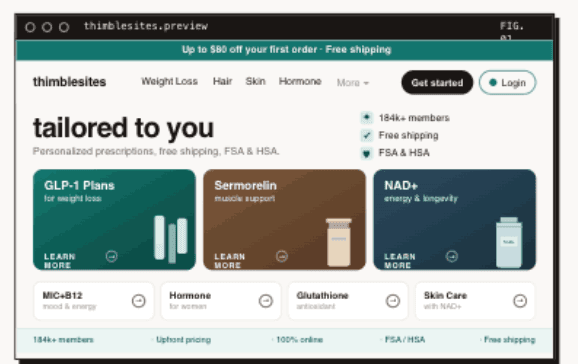

Here's a pattern we see constantly: a telehealth company grabs Typeform or Jotform, signs a BAA with the vendor, builds a 40-question intake form, and calls it HIPAA-compliant. Technically, they're not wrong. They have a Business Associate Agreement. The data is encrypted. The checkboxes are checked.
But compliance is the floor, not the ceiling. That form is still hemorrhaging patients at every step, routing data into a black hole, and creating manual work for your ops team. A signed BAA doesn't fix any of that.
We build intake flows for telehealth companies every day at Thimble Hub. The difference between a generic form with a BAA and a prescription-grade intake system is the difference between a clipboard in a waiting room and a seamless patient experience. Let's break down what actually matters.
What "HIPAA-Compliant" Actually Means for Intake
Most founders think HIPAA compliance for intake starts and ends with a BAA from their form provider. It doesn't. A BAA is step one of about twelve. Here's what a genuinely compliant intake architecture requires:
- A signed BAA with every vendor that touches PHI: your form builder, your CRM, your payment processor, your analytics platform.
- Encryption in transit (TLS 1.2+) and at rest (AES-256 is the industry standard) for all patient data - currently an addressable safeguard under HIPAA, and would become required under the proposed 2024 update.
- Access controls: who on your team can see what data, and is that logged?
- Audit trails: can you prove who accessed a patient's intake data and when?
- Data retention and disposal policies: what happens to intake data after it's processed?
- Breach notification procedures: if something goes wrong, do you have a plan?
The real question isn't whether your form provider offers a BAA. It's whether your entire data pipeline, from the moment a patient types their first answer to the moment that data lands in your EHR, is compliant at every handoff.
Where Generic Form Builders Fall Apart
Generic form builders are designed for surveys, event registrations, and contact forms. They were never built for medical intake. And once you start using them for healthcare, the cracks show up fast.
No Real Conditional Logic for Medical Screening
Medical intake isn't linear. A patient reporting chest pain needs a completely different follow-up sequence than one reporting seasonal allergies. Most form builders offer basic "show/hide" logic, but they can't handle deep branching trees, multi-variable conditions, or clinical decision logic that determines which provider a patient should be routed to.
You end up with one of two outcomes: a massive form that asks everyone everything (terrible UX), or a form so simplified it doesn't capture the clinical information your providers actually need (useless data).
No Integration with Your Clinical Workflow
The form captures data. Then what? In most setups, someone on your team exports a CSV, reformats it, and manually enters it into your EHR or provider dashboard. Or the data sits in the form platform's database, disconnected from everything else.
That's not a workflow. That's a bottleneck with a BAA attached to it.
Why Generic Forms Fail on Mobile Devices
Most telehealth patients access care via mobile device. Generic form builders render long questionnaires as endless scrolling pages or tiny input fields on mobile. Progress indicators are vague or missing. Patients don't know how much is left. They bail.
Missing Trust Signals
Patients are being asked to share sensitive medical and personal information. A generic-looking form with no branding, no privacy reassurance, and no context about why each question is being asked creates friction and distrust. When the form looks like it could be a phishing page, don't be surprised when patients close the tab.
What Prescription-Grade Intake Actually Looks Like
We use the term "prescription-grade" deliberately. It means the intake is purpose-built for a specific clinical use case, not a generic template with a healthcare skin on it. Here's what separates it from the default.
Progressive Disclosure
Don't ask for everything upfront. Start with the basics: name, state, date of birth. Let the patient make a small commitment before you ask about their medical history, medications, and symptoms. Each step should feel manageable and purposeful.
This isn't just good UX. It's good psychology. Once a patient has invested two minutes answering simple questions, they're far more likely to complete the full intake. Front-loading 25 clinical questions before they've even selected a service guarantees drop-off.
Conditional Branching That Mirrors Clinical Thinking
The form should think like a clinician. If a patient selects "weight management" as their reason for visit, they should see questions about BMI history, current medications, and prior treatments. If they select "hormone therapy," they get an entirely different branch. No irrelevant questions. No wasted time.
- Skip logic based on age, sex, state, condition, and medication history.
- Multi-variable routing: not just "if X, show Y" but "if X and Y and not Z, route to Provider Group A."
- Automatic disqualification screens for contraindications, with clear messaging and alternative next steps.
Mobile-First, Not Mobile-Adapted
There's a difference between a form that works on mobile and a form designed for mobile. Prescription-grade intake uses single-question screens, large tap targets, clear progress indicators, and auto-advancing inputs. It feels like a modern app, not a PDF someone crammed onto a phone screen.
Built-In Privacy and Trust
Every screen should reinforce that the patient's data is protected. That means visible HIPAA compliance badges, clear language about data usage, your brand's look and feel (not a third-party form builder's), and encryption indicators. Trust isn't assumed in healthcare. It's earned at every touchpoint.
// PULLQUOTEPatients don't read your privacy policy. They read your design. If the experience feels secure, professional, and intentional, they trust it. If it feels like a survey monkey form, they don't.
Why Patient Intake and Checkout Should Be the Same Flow
Here's the insight most telehealth companies miss: your intake form is not a separate step from your checkout process. It IS your checkout process. The moment a patient starts answering medical questions, they're in a buying decision. Every unnecessary question, every confusing screen, every broken mobile layout is a reason to leave.
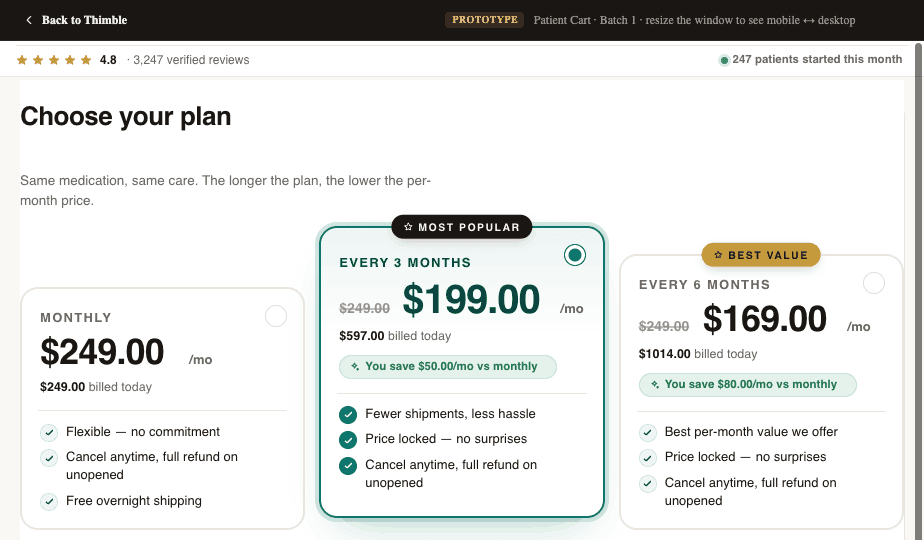
This is exactly why Thimble Cart integrates intake directly into the checkout flow. The patient selects a service, answers the relevant clinical questions, provides payment, and completes their visit, all in one continuous experience. No redirect to a separate form. No "we'll email you a questionnaire after you pay." One flow, start to finish.
The best intake flows feel effortless. The patient doesn't think of it as "filling out a form." They think of it as "getting started with their treatment." That mindset shift, from bureaucratic hurdle to onboarding experience, is what separates high-converting telehealth operations from the rest.
Data Routing: Where Intake Data Actually Needs to Go
Collecting data is the easy part. Getting it to the right place, in the right format, at the right time. That's where most setups fall apart.
When a patient completes an intake, that data needs to flow to multiple systems simultaneously:
- Your CRM: for patient records, follow-up sequences, and lifecycle tracking.
- Your EHR or clinical platform: so the provider has the patient's history before the visit.
- Your provider routing system: to match the patient with the right clinician based on state, condition, and availability.
- Your payment processor: to handle charges, subscriptions, and insurance verification.
- Your compliance logs: for audit trails and data governance.
If any of these connections require manual intervention (exporting, re-entering, copy-pasting), you have a scaling problem. It works when you're seeing 20 patients a week. It breaks at 200. It's a disaster at 2,000.
Thimble Cart handles this by design. Intake data flows directly into your existing systems through clean integrations, no middleware hacks, no Zapier chains held together with duct tape. Whether you're using a standard form tool like Formsort or Cognito Forms, or a fully custom-built intake, the data pipeline is the same: structured, automated, and compliant.
You Don't Have to Rip and Replace Your Form Builder
One of the most common misconceptions we hear: "We'd need to rebuild our entire intake to make it compliant and high-converting." Not necessarily.
Thimble Cart is form-builder agnostic. If you've already invested in Formsort, Typeform, Jotform, Cognito Forms, or Fillout, you can keep using them. What changes is how the intake is structured, sequenced, and integrated, not the underlying tool.
- Already using Formsort with solid conditional logic? Great. We optimize the flow and plug it into a unified checkout experience.
- Have a Jotform setup that collects the right data but has poor mobile UX? We restructure it without rebuilding from scratch.
- Need something fully custom for a complex clinical workflow? We build it purpose-fit.
The point isn't the form tool. It's the architecture around it: how the intake connects to checkout, how data routes downstream, and how the whole experience feels to the patient.
Can You Have Both Compliance and High Conversion?
There's a persistent myth in telehealth that making intake more compliant means making it more painful. More disclosures, more fields, more friction. It doesn't have to be that way.
The best intake flows we've built are simultaneously the most compliant and the highest-converting. That's not a coincidence. Good compliance architecture (encryption, access controls, audit trails) is invisible to the patient. It happens in the infrastructure, not in the UI. And good conversion design (progressive disclosure, conditional branching, mobile-first layouts) actually makes it easier to collect the data you need for compliance.
// PULLQUOTEYou don't have to choose between a form that converts and a form that's compliant. You just have to stop treating them as separate problems.
When intake is built right (purpose-designed for your clinical workflow, integrated into checkout, routing data cleanly to every downstream system), you get both. More patients complete the flow. The data is cleaner. Your ops team isn't drowning in manual entry. And your compliance posture is airtight.
That's what prescription-grade intake means. Not a form with a BAA stapled to it. A system that was built, from the ground up, for healthcare.
Frequently Asked Questions
- Is Typeform HIPAA compliant for patient intake?
- Typeform offers a BAA on its Business plan, which is one requirement for HIPAA compliance. However, a BAA alone does not make your intake HIPAA-compliant. You still need encryption in transit and at rest, access controls, audit trails, data retention policies, and breach notification procedures. Typeform handles basic compliance, but most telehealth teams outgrow it due to limited conditional logic and poor mobile experience.
- What makes a patient intake form HIPAA compliant?
- HIPAA-compliant intake requires six elements: a signed BAA with every vendor that touches patient data, encryption in transit (TLS 1.2+) and at rest (AES-256 is industry standard and best practice, and would be required under the proposed 2024 update), role-based access controls, audit trails logging who accessed what data and when, data retention and disposal policies, and breach notification procedures. The form builder is just one piece; compliance must extend across the entire data pipeline.
- What is the difference between a BAA and HIPAA compliance?
- A BAA (Business Associate Agreement) is a legal contract where a vendor agrees to handle protected health information responsibly. It is one requirement for HIPAA compliance, not the whole thing. Full compliance also requires technical safeguards (encryption, access controls), administrative procedures (training, policies), and physical safeguards. Many telehealth companies sign a BAA and mistakenly assume they are fully compliant.
- How do you reduce patient intake form abandonment?
- Use progressive disclosure: start with simple questions and gradually increase depth. Break long forms into digestible steps with clear progress indicators. Design mobile-first with single-question screens and large tap targets. Remove redundant or unnecessary questions. Save progress so patients can resume later. Most importantly, move the full medical intake to post-checkout so patients complete payment before the longest part of the form.
Building a telehealth brand?
Thimble Hub gives you the checkout, intake, patient portal, and EHR-routing infrastructure so you can launch in weeks, not quarters. Modular, HIPAA-ready, no lock-in.