

You already know it's time to switch. The signs have been piling up for months. Your checkout flow is leaking conversions. Patients complain about the portal experience. Your ops team spends hours on workarounds that should be automated. And every time you want to test a new provider network or pharmacy partner, you're told it'll take weeks of custom development.
You know the current platform is holding you back. But the thought of migrating? That's the part that keeps you stuck. Switching telehealth platforms feels less like changing a tool and more like demolishing your house to fix the plumbing. It doesn't have to be that way. We've helped telehealth teams migrate off platforms that were costing them patients and revenue, without tearing down what was already working. Here's the playbook.
Why Is It So Hard to Switch Telehealth Platforms?
Let's be honest about why switching platforms feels like such a massive undertaking. It's not because the technology is inherently hard to move. It's because most telehealth platforms are designed to make it hard to leave. All-in-one platforms bundle everything together: your checkout, your marketing site, your patient portal, your data, your provider integrations, your pharmacy connections. On paper, that sounds convenient. In practice, it means everything is entangled. You can't replace the checkout without disrupting the portal. You can't update the patient experience without touching the site. You can't switch provider networks without rebuilding intake flows.
This is by design. Platform lock-in keeps you paying, keeps you dependent, and keeps you from shopping alternatives. The switching cost isn't a bug. It's a business model.
And so teams stay. They stay on platforms that drop 30% of potential patients at checkout. They stay on platforms where the patient portal feels like it was designed in 2014. They stay because the alternative (migrating everything at once) sounds worse than the daily pain of working around a system that doesn't fit anymore.
The Modular Migration: Replace Layers, Not Everything
Here's the core idea that changes everything: you don't have to replace your entire platform at once. You can replace one layer at a time.
Think of your telehealth operation as a stack of layers. At the top, you've got your marketing site, the thing that attracts visitors. Below that, your checkout and intake flow, the thing that turns visitors into patients. Then your patient portal, the ongoing experience layer. And underneath all of that, your operational backbone: your EHR, your CRM, your provider network, your pharmacy partners.
In a modular architecture, each of these layers can be swapped independently. You can replace your checkout without touching your site. You can upgrade your patient portal without migrating your EHR data. You can launch a new marketing site without disrupting a single patient flow.
// PULLQUOTEThe best migrations don't feel like migrations. They feel like upgrades, one layer at a time, with no downtime and no drama.
This is how modern telehealth teams are approaching platform changes. Instead of a six-month, all-or-nothing re-platforming project, they identify the layer that's hurting them most, replace it with something better, and keep everything else running. Then they evaluate, iterate, and decide what to tackle next.
A Practical Migration Playbook
Let's get specific. If you're considering a platform switch, or even just replacing one piece of your stack, here's a step-by-step approach that minimizes risk and maximizes speed.
Step 1: Identify the Bottleneck
Before you touch anything, figure out where you're actually losing patients and revenue. This isn't about what annoys your team the most (though that matters). It's about what's costing you the most.
- What's your checkout completion rate? If a meaningful share of patients who start checkout aren't completing it, your checkout flow is likely the biggest bottleneck.
- How many patients drop off during intake? Long, clunky intake forms are a silent killer.
- What does your patient portal experience look like? Are patients calling support for things they should be able to do themselves?
- How long does it take to onboard a new provider network or pharmacy partner? If it's weeks instead of days, your integrations are too rigid.
- Is your marketing site converting traffic, or is it a brochure that doesn't drive action?
Be ruthless about this step. You're looking for the one layer where improvement will have the biggest downstream impact. Everything else can wait.
Step 2: Audit Your Data Flows
Once you know what you're replacing, map out what needs to keep working during the transition. This is where most migrations go sideways, not because the new tool doesn't work, but because someone forgot about a data dependency. Ask these questions:
- Where does patient data flow after checkout? Does it go to an EHR, a CRM, a pharmacy, all three?
- What triggers downstream processes? A completed order might kick off prescription routing, provider assignment, or patient communication.
- What data formats and APIs are involved? You need to know what the receiving systems expect.
- Are there compliance requirements for data handling during transition? HIPAA doesn't take a break while you migrate.
Document every integration point. Every webhook. Every data handoff. This map becomes your migration safety net. If you know exactly what connects to what, you can swap a layer with confidence that nothing downstream breaks.
Step 3: Replace One Layer at a Time
Now you build, but you build surgically. You're replacing one layer while keeping every other layer exactly where it is. If you're replacing your checkout flow, for example, the new checkout connects to your existing provider network, your existing pharmacy, your existing EHR. The patient fills out a new, better intake form. Their data flows into the same systems your team already uses. Nothing changes on the backend. Everything improves on the frontend.
This approach has a massive advantage over full re-platforming: it's fast. When you're only replacing one layer, you can go from kickoff to launch in days, not months. You're not waiting on a complete data migration. You're not retraining your entire team. You're not holding your breath during a big-bang cutover.
Step 4: Validate, Iterate, Expand
Once the new layer is live, watch the numbers. Is checkout completion up? Are patients getting through intake faster? Is the data flowing correctly to your downstream systems? Give it a couple of weeks. Talk to your team. Talk to your patients. Identify what's working and what needs tuning. Then decide: is the next bottleneck worth addressing now, or is the current improvement enough to move the needle?
For example, if replacing checkout produced a meaningful improvement in conversions, that's validation to keep going. The patient portal might be the next friction point. You can replace that layer next, again without touching the checkout you just built or the site that's still working fine.
This iterative approach lets you spread the migration across time, across budgets, and across your team's bandwidth. No one has to work weekends on a massive cutover. No one has to cross their fingers and hope the whole system works on launch day.
What to Look for When Choosing a New Telehealth Platform
Not every platform supports this kind of modular migration. If you're evaluating alternatives, here's what separates tools that enable incremental change from tools that demand another all-in-one commitment.
- 01.API-first architecture. The platform should connect to your existing tools through well-documented APIs. If their answer to 'how do I integrate with my EHR?' is 'use ours instead,' walk away.
- 02.Works with any provider network and pharmacy. You should never be locked into a single fulfillment path. Your checkout should point to whatever providers and pharmacies you choose, now and in the future.
- 03.Modular product design. You should be able to adopt one piece without buying the whole suite. Need just a better checkout? Great. Need just a patient portal? Fine. Need both? Also fine. But the choice should be yours.
- 04.Fast time-to-launch. If the vendor says the implementation will take three to six months, that's a red flag. A well-designed modular tool should launch in weeks, not quarters.
- 05.Your data stays yours. This is non-negotiable. You should be able to export your data at any time, in standard formats. If the platform makes it hard to leave, they'll make it hard to grow, too.
What Does It Cost to Stay on the Wrong Platform?
We hear this a lot: 'We know we need to switch, but now isn't the right time.' And look, we get it. Migrations are disruptive. Your team is busy. There's always something more urgent. But here's the math that most teams don't do: every month you stay on a platform that doesn't convert is revenue you're permanently losing. Not deferring. Losing.
As a hypothetical example: if your checkout conversion improved by 20 percentage points, you'd recover that share of patients you're currently losing every month. Over a year, that compounds into a significant amount of recovered revenue. And it's not just the direct revenue; it's the lifetime value of every patient who bounced at checkout and never came back.
// PULLQUOTEThe cost of migration is a one-time expense. The cost of staying on a platform that doesn't convert is a recurring one.
There's also the competitive angle. While you're working around your platform's limitations, your competitors are launching faster, converting better, and capturing the patients you're losing. The telehealth market is growing, but it's also getting more competitive. The teams that move quickly on infrastructure have a compounding advantage over the ones that wait.
And here's the thing that might surprise you: with a modular approach, the migration cost is dramatically lower than you think. You're not rebuilding everything. You're replacing one layer. The timeline is days and weeks, not months and quarters. The risk is contained because everything else keeps running.
What This Looks Like with Thimble Hub
We built Thimble Hub specifically for teams in this position: telehealth businesses that know their current platform isn't working but can't afford a full rebuild. Our products are designed to be modular from the ground up.
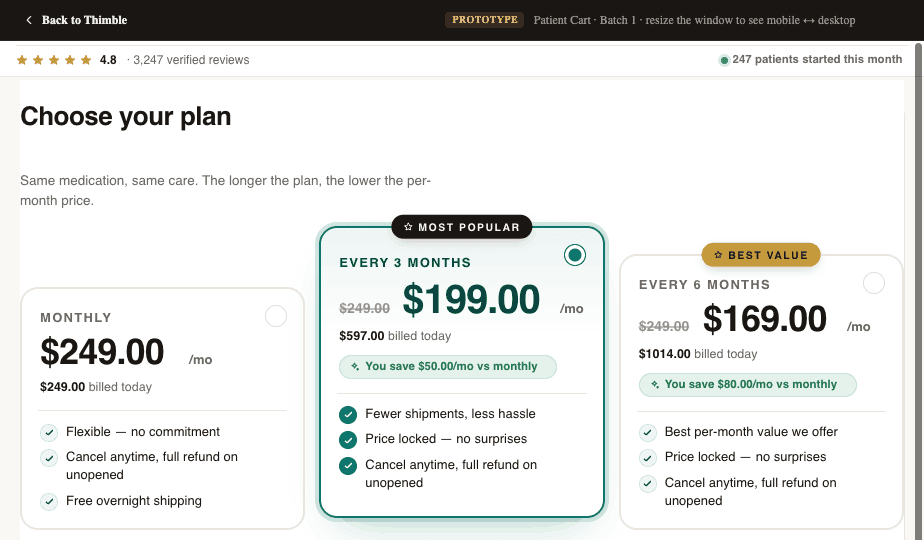
Thimble Cart is our custom checkout and intake layer. It works with any provider network, any pharmacy, and any form builder. You can drop it into your existing stack without touching your site, your portal, or your backend systems. If your checkout is the bottleneck, Cart fixes it, without forcing you to change anything else.
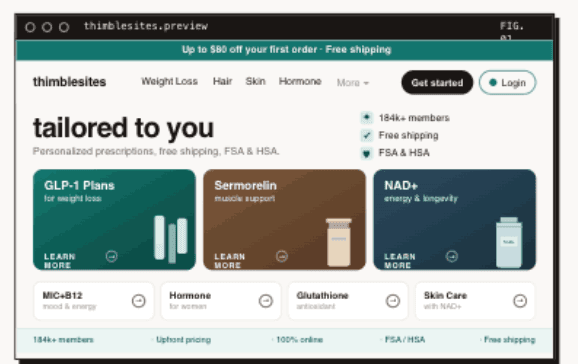
Thimble Sites handles your marketing website. Need a site that actually converts traffic into patients? Sites can be built and launched independently of your other tools. Your checkout can live on a different platform. Your portal can be somewhere else entirely. The site just works.
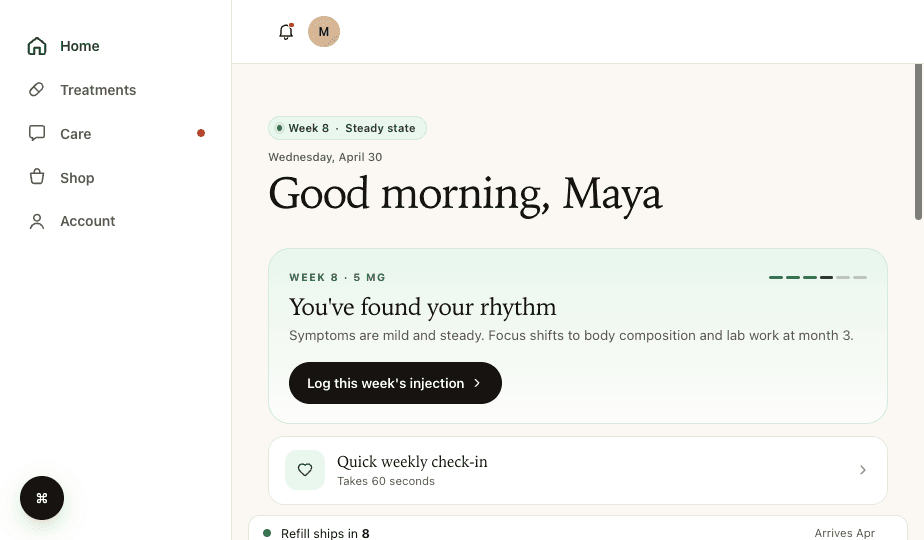
Thimble Portal is your patient experience layer. It works alongside your existing EHR and CRM; it's not trying to replace them. Portal gives your patients a modern, clean interface for managing their care, while your clinical and operational data stays in the systems your team already knows.
- Adopt one product or all three, each works independently
- Launch in under 12 days, not 6 months
- Connect to your existing provider networks, pharmacies, and tools
- No lock-in: your data and your stack stay yours
- Dedicated team supporting your migration from start to finish
We're not an all-in-one platform, and that's the point. We're infrastructure that plugs into the gaps in your current stack. Replace what's broken. Keep what works. Launch fast.
The Right Migration Partner Makes All the Difference
Technology matters, but so does the team behind it. A modular tool only works if you have people who understand your specific situation: your integrations, your compliance requirements, your patient flows, your timeline. We've seen teams try to migrate with vendors who hand over API docs and say 'good luck.' That's not how this should work. Migration support should mean a dedicated team that maps your data flows with you, configures the new layer for your specific stack, runs parallel testing before cutover, and stays with you through the first weeks after launch.
At Thimble Hub, migration support is baked into how we work. We're a boutique team, not a platform factory. Every client gets hands-on help from people who've mapped these exact integrations before. We don't just hand you a tool; we help you install it, test it, and optimize it.
The Bottom Line
Switching telehealth platforms doesn't have to mean rebuilding everything. The all-in-one model wants you to believe that migration is an all-or-nothing proposition. It's not.
Identify your biggest bottleneck. Map your data flows. Replace one layer with something better. Validate the improvement. Then decide what to tackle next.
The right infrastructure partner makes this process fast, low-risk, and high-impact. You keep your existing tools, your existing data, and your existing workflows. You just upgrade the layer that's been holding you back.
Your patients deserve a better experience. Your team deserves better tools. And you don't have to burn everything down to get there.
Frequently Asked Questions
- How long does it take to switch telehealth platforms?
- It depends on the scope. A full all-or-nothing platform replacement typically takes three to six months minimum when you account for data migration, integration rebuilds, provider retraining, and parallel testing. A modular approach is dramatically faster because you're replacing one layer at a time. Replacing just your checkout and intake flow, for example, can go from kickoff to live in under two weeks. The more you try to change at once, the longer it takes and the more risk you introduce.
- Will I lose patient data during a platform migration?
- Not if the migration is planned carefully. Before replacing any layer, audit every integration point where patient data flows: what goes to your EHR, what goes to your CRM, what triggers your pharmacy routing. A well-executed modular migration maintains the same downstream data connections throughout, so patient records, order history, and clinical notes stay intact in the systems your team already uses. The new layer connects to the same endpoints the old one did. The risk of data loss comes from rushed all-or-nothing migrations, not from methodical layer replacements.
- Can I migrate from an all-in-one platform to a modular stack?
- Yes, and this is one of the most common paths we support at Thimble Hub. The key is identifying which layer of your current platform is causing the most pain and replacing that piece first, while keeping everything else in place. Your existing EHR, provider network, and pharmacy relationships can stay exactly where they are. You connect a new checkout, portal, or marketing site to those existing systems and validate that data flows correctly before cutting over. The fact that you started on an all-in-one platform does not mean you have to rebuild everything at once to leave it.
- What should I look for in a new telehealth platform?
- Five things matter most. First, API-first architecture: the platform should connect to your existing tools through documented APIs rather than demanding you replace them. Second, provider and pharmacy flexibility: you should never be locked into a single fulfillment path. Third, modular adoption: you should be able to use one piece without buying the whole suite. Fourth, launch speed: a well-designed platform should have you live in weeks, not quarters. Fifth, data portability: your patient data should be exportable in standard formats at any time. If a platform makes it hard to leave, it will make it hard to grow too.
- How do I maintain subscription continuity during a switch?
- Continuity for existing subscribers requires mapping your subscription logic before you touch anything. Know which systems own the subscription records (your payment processor, your CRM, your patient portal), what events trigger renewals and cancellations, and how subscription status determines patient access to services. When you replace a platform layer, the new layer should connect to the same subscription data sources. Avoid scenarios where patients have to re-enter payment information or re-enroll in a plan. Running your old and new checkout in parallel for a short window, routing new patients to the new flow while existing subscribers renew through the old one, is a safe way to transition without disrupting anyone mid-subscription.
Building a telehealth brand?
Thimble Hub gives you the checkout, intake, patient portal, and EHR-routing infrastructure so you can launch in weeks, not quarters. Modular, HIPAA-ready, no lock-in.